What's new in BlueDolphin

Product News

Showing all 32 updates

Bring structure to your Views list with tags

  • Tag views using shared, descriptive terms your team. Tags appear as clear colored chips in the Views list.
  • Combine tags with other filters to narrow the Views list down to what you need.
  • Assign up to multiple tags per view to capture different dimensions.
  • Case-insensitive matching, so near-duplicate tags won't clutter your list.

With a growing Views list, tags let you categorize views by what’s relevant to you. Since views are tagged, the new Tags filter finds what you need, requiring no digging.

Published September 8, 2026 · View the original announcement

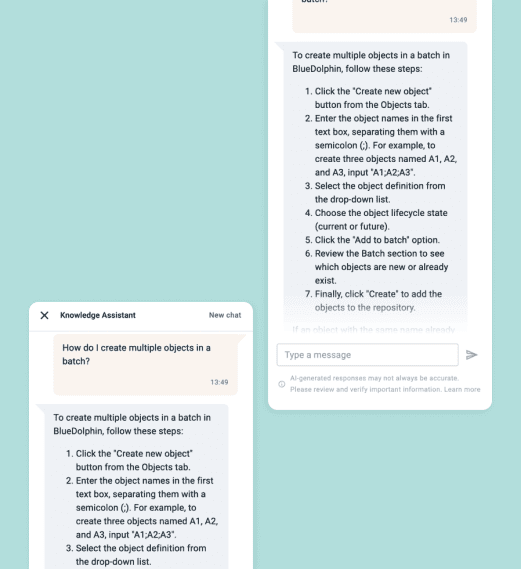
Communicate in natural language to find business information in BlueDolphin

  • Ask questions in natural language and get pointed to the objects, views, processes, and other content you're looking for.
  • Every answer is grounded in your own BlueDolphin repository, with direct links to the relevant content.
  • Navigate confidently even if you don't know exactly where information lives.

As your repository grows, finding the right object or view can take longer to navigate and become harder to keep track of. AI Navigator removes that friction. Instead of hunting through menus and structures, you can now ask in natural language in AI Navigator and get grounded, contextual answers.

Published September 1, 2026 · View the original announcement

Navigate seamlessly between connected processes

  • Move between processes without leaving your workflow.
  • Spot which objects connected to a workflow, at a glance.
  • Element names matched to the linked process.
  • Navigate using the arrow indicator or the side panel.

Process modeling doesn’t have to happen in isolation. BlueDolphin’s navigation feature, native to BPMN process diagrams, keeps related processes linked and allows them to evolve together.

Published August 6, 2026 · View the original announcement

Bulk-manage, search, and organize views from View list

  • Manage Views at scale: Change ownership or delete up to 100 views in one action.
  • Precise search: Filter by title, owner, status, type, and more to find exactly what you need.
  • Instant privacy control: Toggle privacy without opening the view.
  • Custom columns: Choose which fields to show, so the list matches how you work.

BlueDolphin lets you find, organize, and act on views in bulk or individually, all from one list, so managing your repository doesn’t mean opening dozens of views one at a time. when you need to jump back to what you were just working on, a Recently Opened shortcut gets you there from the View list.

Published August 3, 2026 · View the original announcement

Capture your BPMN diagram context

  • Attach metadata- risk levels, compliance checks, technical specs, to any BPMN element.
  • Precise access control: sensitive data stays restricted, relevant data is visible for relevant role.
  • Capture every detail with diverse field types and clearly marked mandatory fields and keep documentation organized.

Process diagrams show how work flows, but they rarely capture the operational, compliance, or risk context behind each step. BPMN questionnaires let that context live directly on the process, structured and permission-controlled. The information stays connected to the model instead of scattered across separate documents that fall out of date.

Published July 13, 2026 · View the original announcement

Pick up your AI Navigator conversations where you left off

  • Resume any past AI Navigator conversation with full context, so you can continue an analysis.
  • Review earlier questions and answers whenever you need to reference past findings.
  • Remove conversations you no longer need to keep your chat history organized.

Every AI Navigator session is saved automatically, so you can step away and come back exactly where you left off, whether you’re revisiting a completed analysis or building on an ongoing one. Your prior conversations stay just a click away, and clearing out the ones you no longer need keeps things easy to navigate.

Published July 7, 2026 · View the original announcement

Do more without leaving the Repository table

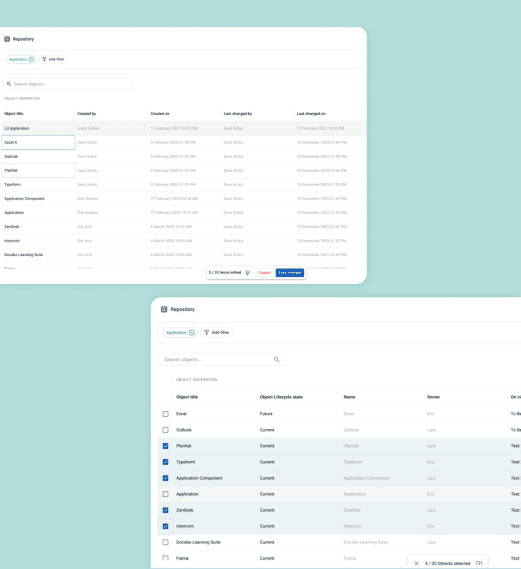
  • Move one or more objects in the Repository to a different business unit in a few clicks.
  • Update lifecycle state straight from the repository.
  • Edit formatted text in a rich text editor, so detailed context stays readable, not cramped into a single cell.

Move objects across business units in bulk: select what needs to move, choose the destination, and you’re done. All without leaving the table view you’re already working in.

Published June 11, 2026 · View the original announcement

Give every business unit its own starting point

  • Set a default view for each business unit.
  • Change or remove a business unit anytime.
  • Work with role-based homepages: the business unit start view only applies within Views, so your regular homepage navigation still works as expected.

BlueDolphin lets you set the right starting point for each business unit, so your team lands on relevant content immediately, without extra clicks or confusion about where to begin. 

Published June 8, 2026 · View the original announcement

Navigate between views without losing your way

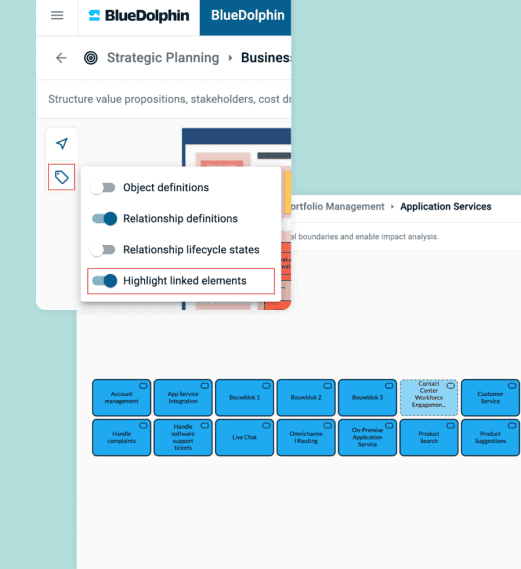
  • Linked elements and relationships highlight as you hover over them, so you always know what's connected before you commit to a change.
  • A visible breadcrumb tracks every view you've navigated through, letting you jump back to any previous view.
  • Revisiting a view already in your trail collapses the path back to that point, so your breadcrumb never gets cluttered with repeats.
  • Your navigation path stays persistent, so a reload doesn't cost you your place.

Complex architecture models involve dozens of interconnected views, and losing track of how you got somewhere slows everyone down. BlueDolphin makes those connections visible as you work and keeps a reliable trail back, so exploring a large model never means starting over.

Published May 22, 2026 · View the original announcement

Keep your dropdown values structured and accurate directly from the BlueDolphin public API

  • Add, update, or remove through the BlueDolphin public API, so dropdown lists stay in sync with your source systems.
  • Remove outdated or incorrect values easily, keeping option lists clean and current.
  • Manage large option lists at scale, with support for up to 7,500 values in a single call.

With full API control over adding, updating, and removing dropdown values, you can automate list maintenance and keep option sets consistent without manual upkeep.

Published May 20, 2026 · View the original announcement

Reuse report configurations with Custom Insights

  • Save the setup of a supported usage or governance report as a Custom Insight, so you don't have to rebuild it from scratch next time.
  • Rename, update, or delete your custom insights as your reporting needs change. Transfer ownership to another user when needed.
  • Find all your saved reports in one place, each showing its owner, creation date, and last modified date.

Rebuilding the same report configuration every time you need it wastes time and creates inconsistency across teams. Custom Insights lets you save a report once and reuse it whenever you need it, while owner and permission controls keep every saved report accurate, accountable, and easy to manage as your organization scales. 

Published May 6, 2026 · View the original announcement

Edit multi-select fields right in the repository

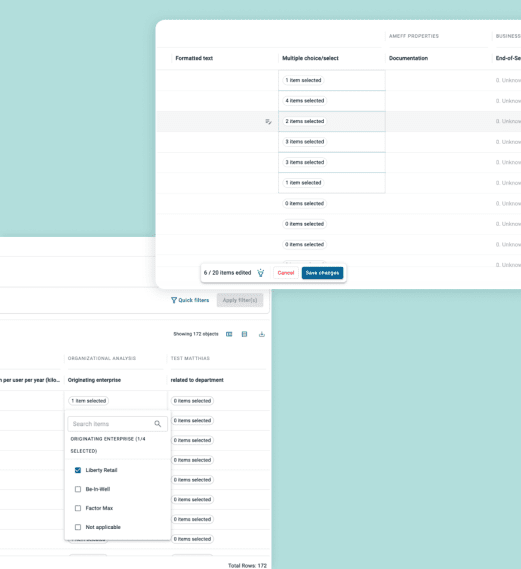
  • Edit multi-select values inline, no separate form needed.
  • Scan dense repository at a glance.
  • Restrict editing access only to users who need it.

BlueDolphin lets you view, search, and edit multi-select data directly from the table, so managing repository data in bulk doesn’t mean clicking every object one by one. 

Published April 9, 2026 · View the original announcement
Land exactly where you need, every time you log in

  • Set a default start page per role.
  • Return to your homepage from anywhere with one click on the BlueDolphin icon.
  • Keep the navigation structure editable and easy to update.

With per-role homepages, you can point each role straight to the view that’s most relevant to their work. Link that view to others to build a navigation path, and keep updating it at any time without breaking the connection.

Published April 9, 2026 · View the original announcement

See the completeness filter right in the Repository

  • Spot the Completeness column in the repository table, no need to open each object.
  • Filter by Completeness to isolate objects that are still missing information and need follow-up.
  • Combine Completeness with other filters to build a focused cleanup or review view.

As your BlueDolphin models grow, keeping track of which objects are fully documented gets harder to do manually. The Completeness column brings that information into the repository table, giving teams a clear, connected view of data quality without extra steps. Paired with the repository’s existing filters, you can build focused views to prioritize what needs work and keep your model audit-ready as it scales. 

Published March 24, 2026

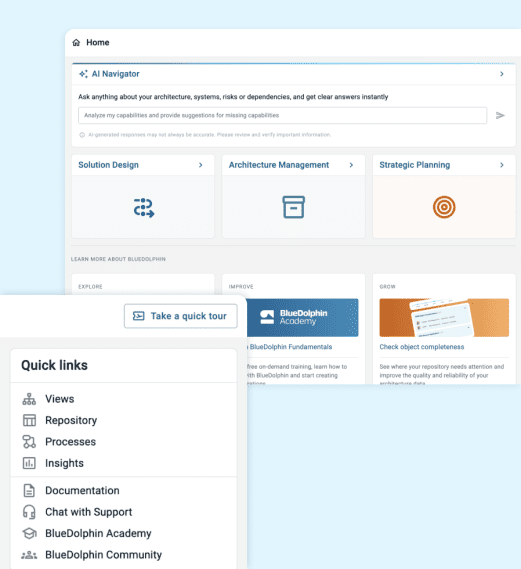
Your new navigation path through BlueDolphin

  • A new navigation bar and main menu bring every BlueDolphin feature within the home page.
  • Quick Links give you direct access to the features you use most.
  • Admins can connect or disconnect views on dynamic Home page cards, so each card can point to the public View your team actually needs.

BlueDolphin’s Home page has been redesigned to a more consistent navigation model. The new menu and Quick Links keep everything you need close at hand, while admins get direct control over which views populate the cards your teams see first.

Published March 17, 2026

Application Services now join your process models

  • Link tasks to Application Services, not just Application Components.
  • Work with Application Services and Application Components object in the same context tab.
  • A new process filter, dedicated to Application Services.

BlueDolphin closes the gap between processes and Application Services. Tasks can now connect to the object, so teams get a complete, accurate view of what supports their operations, without a separate tool or workflow.

Published March 12, 2026

Governance Insights now covers your object, relationship, and view-coverage reports

  • See every source and target object connected by a relationship, each with its metadata, properties, and questionnaire data.
  • See the relationship itself, including its metadata and questionnaire data.
  • Spot which active objects of a chosen definition are missing from a specific view, so nothing falls out of scope unnoticed.

Governance Insights gives you one unified home for object, relationship, and view-coverage reporting. That makes it easier to keep oversight of your data’s completeness, relationships, and view coverage, all from a single, workspace-aware location. 

Published March 10, 2026 · View the original announcement
Get visibility into your environment views and your surveys’ performance

  • See which guest users are accessing your Process Portal through SSO, even without a BlueDolphin account.
  • Track every survey's lifecycle, configuration, and ownership from a single report.
  • Spot surveys that need attention, before they become a problem.

Knowing who has access and which surveys are still active is core to good governance. These reports give admins a connected view of guest access and survey health, so risks and expiring surveys surface early instead of going unnoticed.

Published February 13, 2026

Plan, share, and manage Solution Design projects, all in one place

  • Link views, diagrams, or URLs to any deliverable, fully tracked.
  • Reorder deliverables by dragging them into place.
  • Bring contributors into the project, not just the view.

BlueDolphin brings deliverable management, project sharing, and view control into one workflow, so project owners and contributors can plan, adjust, and collaborate without needing separate tools to track who’s responsible for what.

Published January 29, 2026

Jump straight from your Architecture View to the process behind it

  • Open a published BPMN process directly from a Business Process object.
  • No manual setup: A BPMN diagram automatically links it to its Business Process object.

Explore your architecture and open the process behind it with a single click. Publish a BPMN diagram, and it’s automatically connected to its Business Process object- double-click in read-only mode, or right-click and select “Open published process” in edit mode to move straight from the architecture view into the process itself.

Published December 30, 2025 · View the original announcement

Reuse BPMN diagram instead of rebuilding it

  • Clone any BPMN diagram in one click, from the list or from within the diagram itself.
  • Keep all ArchiMate connections intact when you clone.

BlueDolphin lets you clone a diagram, with structure and ArchiMate relationships intact, and start editing immediately, without missing the architecture connections that made the original diagram useful. 

Published December 10, 2025 · View the original announcement

Process Browser: More context, more visibility, more people

  • See which applications, roles, and data each process connects to, in Perspectives.
  • Search by process name, or by a connected application, role, or object. Both paths surface the same process-to-architecture connections.
  • See publication status at a glance.
  • Give the wider organization read-only access, without extra licenses.
  • Keep drafts and private content hidden from everyone.

Process knowledge shouldn’t be locked to the people who model it. By connecting published processes to their EA context automatically and opening read-only access to any SSO-authenticated user, BlueDolphin lets your business and technology teams explore the same information side by side, without extra setup, extra licenses, or a trip through someone else’s diagram.

Published December 4, 2025

Organize complex diagrams visually

  • Color-code any BPMN element to categorize and structure your process.
  • Six colors, saved automatically.
  • Reset to default anytime.

BlueDolphin lets you organize elements with color, directly in the editor, so complex processes can be easy to scan. 

Published November 6, 2025 · View the original announcement
SmartViews: Switch any Repository view into a visual ArchiMate view.

  • Turn any object list into a visual, ArchiMate view with a single click.
  • Pan and zoom to explore how your architecture components relate to each other.
  • Download any canvas as a PNG or JPG to share or document your architecture.

SmartViews gives you a visual read on your architecture without leaving the Repository, keeping your context connected as you move between structured data and visual layout. Whether you’re exploring relationships or preparing something to share, you stay in one workspace, working with the same filtered, up-to-date view. 


Published November 3, 2025

Cut down on setup time by cloning a project

  • Clone any project in one click.
  • Control what gets copied over.
  • Start editing right away.

BlueDolphin clones a project’s structure and architecture views in one action, so you can focus on drafting the changes that matter instead of rebuilding a recurring project type or template from scratch.

Published October 29, 2025 · View the original announcement

Connect BlueDolphin to external tools with real-time webhook notifications via the BlueDolphin Public API

  • Get notified the instance objects are created, updated, or archived, so external systems stay in sync without polling.
  • Filter subscriptions by workspace, object type, or lifecycle state to receive only the events relevant to your integration.
  • Turn subscriptions on or off at any time, giving you full control over when notifications go out.

For teams building integrations, BlueDolphin can now push changes to your systems the moment they happen, instead of relying on manual checks or scheduled syncs. Configure each subscription and trigger automation, update a dashboard, or keep another platform aligned with what’s happening in your repository.

Published October 7, 2025 · View the original announcement

Bring your enterprise architecture into your currently used AI assistant

  • Connect BlueDolphin directly to Claude, Microsoft Copilot, or another AI assistant, so it can query your architecture data on demand.
  • Your assistant pulls answers straight from ArchiMate objects, Solution Design views, and BPMN process diagrams, no need to open BlueDolphin.
  • Read-only access means your assistant can retrieve architecture data through it, never create, update, or delete anything.

Connect BlueDolphin to your organization’s AI assistant to make enterprise architecture something anyone can ask about- no BlueDolphin login, no learning curve, no navigating the repository. Employees ask their questions and get answers back in plain language.

Published October 2, 2025 · View the original announcement
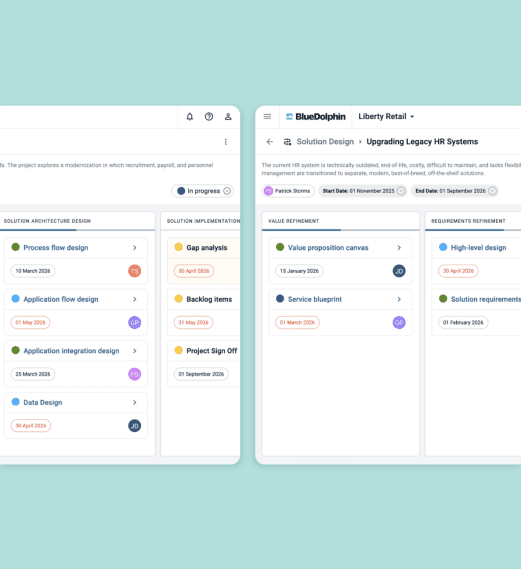
Add the right view to every deliverable

  • Create a new view directly from the deliverable.
  • Connect a deliverable to an existing view.
  • See what's linked.

Create or connect a view based on what the deliverable needs, so you can choose whether to create a new view or connect to an existing one. 

Published October 2, 2025 · View the original announcement

Keep Quick filters tidy and easy to navigate

  • Delete Quick filters you no longer need, permanently removing them from the repository.

Retire the filters you no longer use to keep the Quick filters dropdown useful and uncluttered. Your repository views stay reliable and easy to navigate, even as the number of saved filters grows. 

Published September 8, 2025 · View the original announcement

Turn a prompt into a fully modeled BPMN diagram in seconds

  • Generate BPMN 2.0-compliant process diagrams from a simple prompt, no modeling experience required.
  • Upload documentation you already have, such as PDFs, images, or text files, and turn it into a structured diagram.
  • As you connect tasks to objects, relevant items from your repository are suggested, keeping every diagram grounded in existing content.

The Modeling Assistant enables anyone, not just trained specialists, to model processesTurn prompts and existing documentation directly into standards-compliant diagrams and remove the bottleneck in getting new processes modeled.

Published September 2, 2025 · View the original announcement

Understand architecture views with no expertise

  • Ask questions and get clear explanations of the relationships, dependencies, and high-level structure behind architecture views, using natural language.
  • An assistant interface inside your Architecture views that is ready whenever a question comes up.
  • Turn what you learn into shareable insights the rest of your team can use.

The Architecture View AI Assistant lets architects and those with less expertise ask questions about an architecture view and get a plain-language explanation of what it shows. That makes it easier for non-technical stakeholders to understand relationships, dependencies, and structure on their own, without relying on someone else to walk them through it. 

Published April 17, 2025 · View the original announcement
The AI Knowledge Assistant is leveling up with a faster, more accurate engine.

  • Quicker, higher-quality, fewer hallucination answers powered by an upgraded AI engine.
  • A new documentation pipeline keeps the Assistant's knowledge current, so you're always working with up-to-date information.
  • A larger context window lets the Assistant handle more complex, detailed questions in a single response.

This update is designed to keep your Assistant experience fast, accurate, and dependable. A continuously refreshed knowledge base and a more capable AI engine work together to give you accurate responses you can lean on, freeing you up to focus on your actual work.

Published December 16, 2024