
This month’s BlueDolphin updates focus on making content management more flexible and navigation more intuitive. You can now reorganize repository content across workspaces with ease and enjoy an improved experience in the new editor with enhanced navigation capabilities.
Move Objects Between Workspaces Directly from the Repository
Managing content across workspaces is now faster and more convenient. You can move one or multiple objects to another workspace directly from the Repository without leaving your current view.
Simply select the objects you want to move, choose Change workspace from the selection bar, and select the destination workspace. Once the move is complete, you’ll receive a confirmation message with a quick link to open the destination workspace.
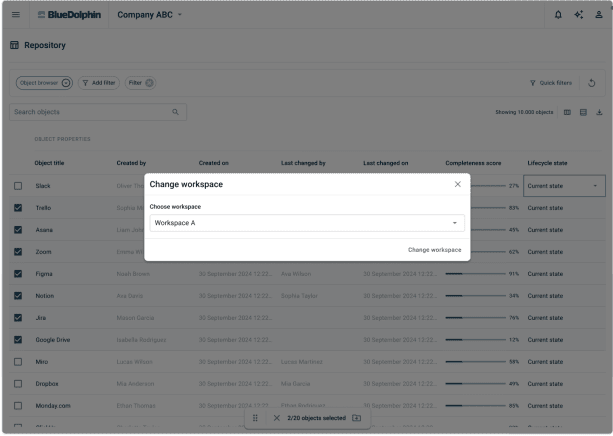
The feature also helps prevent duplication. If some of the selected objects already exist in the destination workspace, you can skip duplicates and move the remaining objects. Permissions are automatically respected, ensuring that only users with the required access can perform workspace transfers.
This enhancement makes it easier to reorganize content, maintain cleaner workspaces, and support evolving architecture and governance structures without unnecessary manual effort.
Enhanced Navigation in the New Editor
The new editor continues to evolve, bringing a more intuitive and streamlined experience while laying the foundation for the future of BlueDolphin editing.
- Navigation has been improved with support for relationship-based navigation. Users can now easily identify linked relationships and navigate directly to connected views or external URLs from within the editor.
- To make moving between views even more seamless, in-canvas breadcrumbs are now available. Breadcrumbs provide clear context about where you are and allow you to quickly navigate back through related views without losing orientation.
These enhancements improve discoverability, reduce navigation friction, and make it easier to explore complex architectures and connected information.
Ready To Put These Updates To Work?
Master BlueDolphin: Visit BlueDolphin Academy to explore learning resources that help you get the most out of BlueDolphin.
Explore the latest BlueDolphin improvements and see how easier workspace management and enhanced navigation can help your teams stay organized and work more efficiently. Try BlueDolphin today.
Or get a tailored demo of these features from one of our experts. Request a demo.